Oct 6, 2026 · by Tawked
Supabase phone auth in Saudi Arabia, with the Send SMS hook
Send Supabase phone sign-in codes to Saudi numbers through the Send SMS hook and Tawked Verify, at SAR 0.09 per delivered code, with no change to your app.
If your app signs people in with Supabase phone auth and your users have Saudi numbers, you can skip the global SMS account and the sender ID registration. Point Supabase's Send SMS hook at Tawked Verify: Supabase still makes and checks the code, Tawked delivers it by SMS to the Saudi phone, and you pay SAR 0.09 per delivered code. signInWithOtp and verifyOtp stay exactly as they are.
The short answer
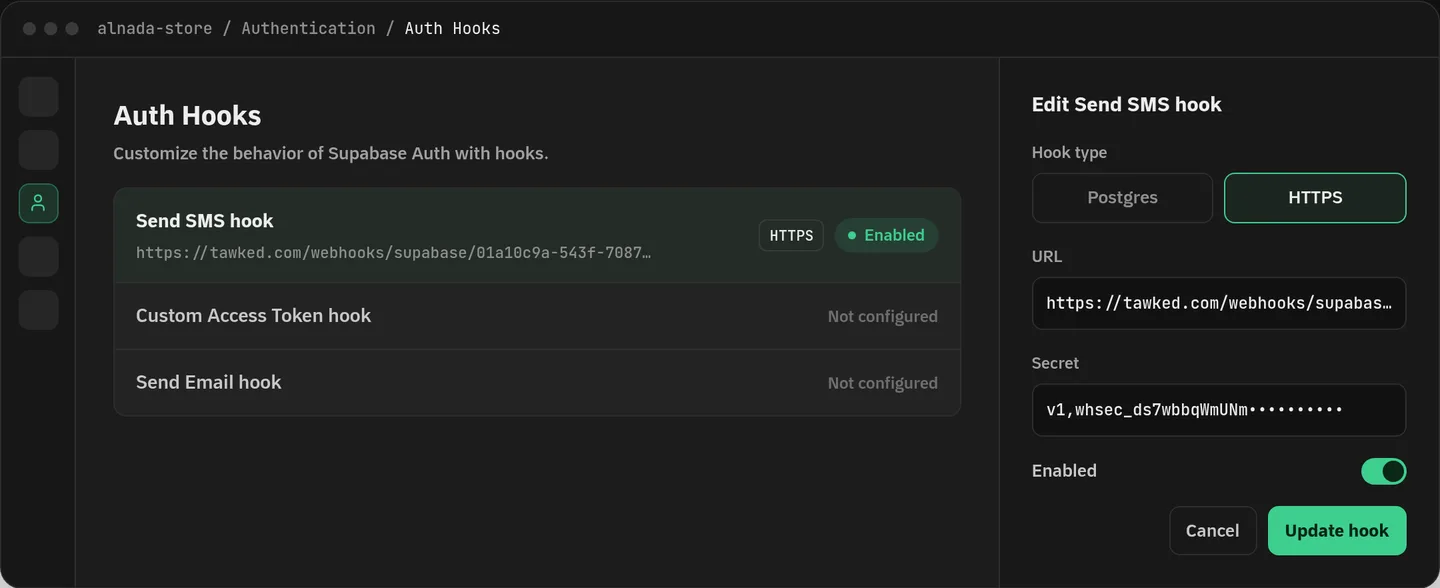
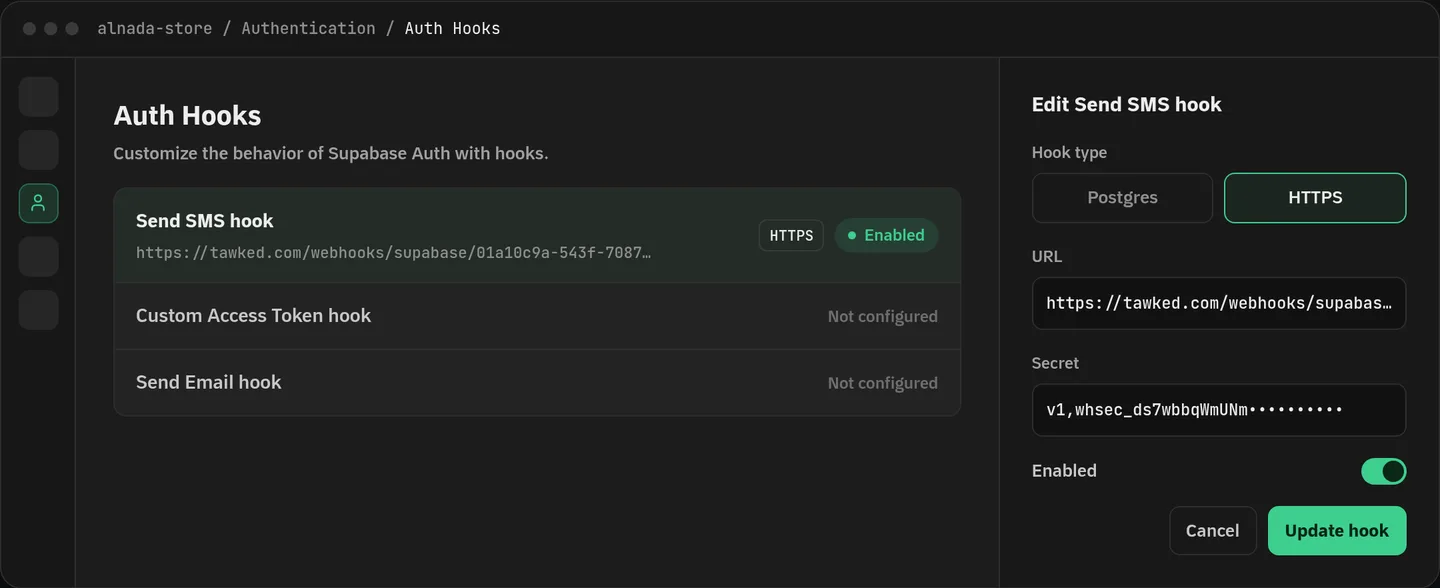
- It is configuration, not code. You turn on Supabase's Send SMS hook as an HTTPS hook and paste in the Hook URL and the Secret from the Supabase page in the Tawked console.
- Supabase keeps the code; Tawked only delivers it. Supabase checks what the user types and opens the session, as it does today.
- SAR 0.09 per delivered code. Prepaid, no contract, a send that fails is not charged, and SAR 10 of free credit at signup.
- Saudi mobile numbers only. Any other number gets a clear refusal that Supabase passes back to your app, so you can show it or send that number to another provider.
- The SMS comes from Tawked's own sender ID and its text names your reviewed application. There is no sender ID of your own in this setup.
Why Saudi numbers are the hard part
Supabase's phone login guide lists MessageBird, Twilio, Vonage and Textlocal (community-supported) as SMS providers, and its Twilio guide adds Twilio Verify. The ones with public prices bill in US dollars, and for Saudi numbers they want a registered sender ID before your messages get through.
Twilio's Saudi guidelines say alphanumeric sender ID pre-registration is required and takes about two weeks, and that the networks block messages from numeric sender IDs. The same page adds that Twilio cannot register sender IDs for domestic brands based in Saudi Arabia, citing a regulation against reselling domestic traffic. Vonage's Saudi page says pre-registration is mandatory and generic names like INFO or SMS are prohibited.
Textlocal is a special case. It is still on Supabase's list, but Textlocal's own page says the platform closed on 31 July 2026 and that every message, API and service stopped that day. If your project used it, you need something else now.
That is the gap the Send SMS hook fills. Supabase's docs say it replaces the built-in SMS sending, and one of the reasons they give is to use a regional SMS provider. It is available on the Free and Pro plans. Here, Tawked is the regional provider.
How it works
Tawked gives your application its own Hook URL and a Secret. Once both are in Supabase, every code Supabase makes goes to that URL instead of the built-in provider, signed with Standard Webhooks.
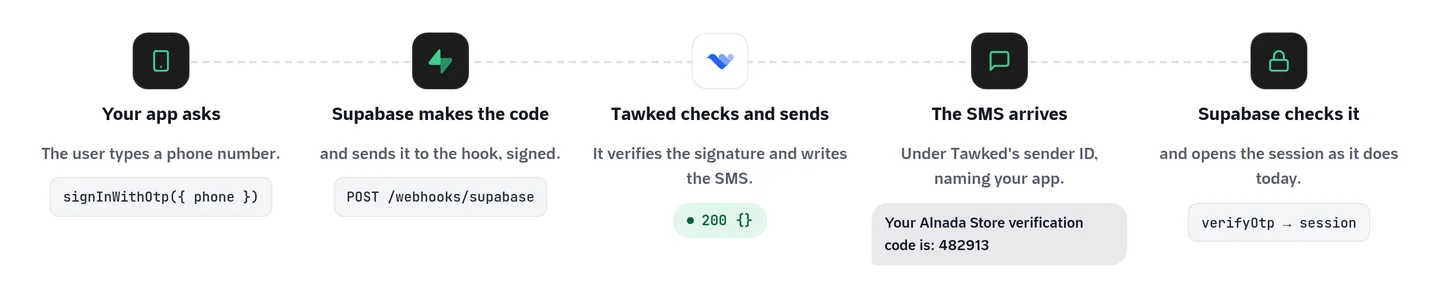
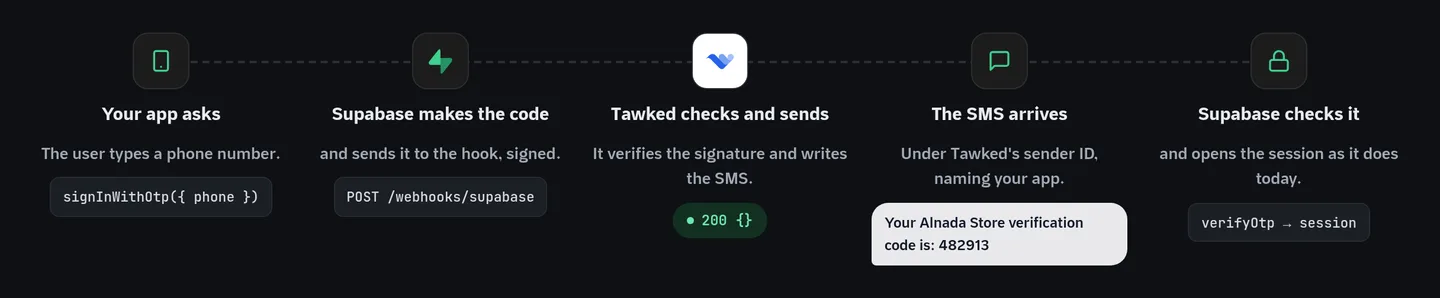
What happens between asking for a code and an open session:
- The user types a phone number and your app calls
signInWithOtp. - Supabase makes the code and posts it, signed, to the Hook URL.
- Tawked checks the signature, that the number is Saudi, your application's state and your balance, then writes the message.
- The SMS arrives from Tawked's sender ID, naming your app.
- The user types the code; Supabase checks it in
verifyOtpand opens the session.
With English chosen for the connection, the message on the phone looks like this, with your app's English name in place of Alnada Store:
Your Alnada Store verification code is: 482913
@example.com #482913
The last line is for autofill. It carries the domain of your reviewed website, which is what lets an iPhone offer the code above the keyboard. In Arabic the first line reads «رمز التحقق الخاص بك لـ» followed by your app's Arabic name and the code. Each connection sends in one language, Arabic until you change it.
One detail for whoever reads the logs: Supabase gives a hook five seconds to answer, as its Auth Hooks page says. So on Supabase's calls Tawked gives its SMS gateway four seconds at most. If the gateway stalls past that, the send counts as failed, the code's price goes back to your balance, and Supabase hears a clear answer in time instead of timing out. If Supabase retries the same request, Tawked recognises it by its id and neither sends nor charges twice.
How it compares to Supabase's built-in providers
| Option | How it connects to Supabase | Public price, one SMS to a Saudi number | Billed on | Sender ID for Saudi numbers | Who checks the code | Message text |
|---|---|---|---|---|---|---|
| Tawked via the Send SMS hook | HTTPS hook | SAR 0.09 per code | Delivery | Tawked's own; the text names your app | Supabase | Arabic or English, written by Tawked |
| Twilio Programmable Messaging | Built-in provider | USD 0.1949 per segment (about SAR 0.73) | Per segment; a "Failed" message pays a USD 0.001 fee | Yours, pre-registered, about 2 weeks; not for brands based in Saudi Arabia | Supabase | Supabase's template |
| Twilio Verify | Built-in provider | USD 0.05 per successful verification plus the SMS (about SAR 0.92 together) | Verification on success; SMS on send | Not stated on the pages we opened | Twilio | Twilio's template |
| Vonage | Built-in provider | USD 0.20167 per message (about SAR 0.76) | Per message; delivery not stated | Yours, pre-registration mandatory | Supabase | Supabase's template |
| MessageBird (Bird) | Built-in provider | Not public (the page shows US rates only) | Per segment; delivery not stated | Not stated on the pages we opened | Supabase | Supabase's template |
| Textlocal | Built-in (community-supported) | Platform closed 31 July 2026 | n/a | n/a | n/a | n/a |
Every price was checked on 2026-10-06 on the pages listed under Sources, converted at USD 1 = SAR 3.75. The Twilio, Vonage and Bird pages price in US dollars and do not say tax is included. Twilio Verify's figure is its USD 0.05 per successful verification plus Twilio's Saudi SMS price, USD 0.2449 in all.
What the table does not show
Segments
Twilio and Bird price each segment. Arabic text is encoded so that one segment holds only 70 characters, so an Arabic message template a little longer than that costs two. Tawked bills the code, not the segment.
Delivery versus sending
Twilio's page adds a USD 0.001 fee for a message that ends as "Failed" and does not say that an undelivered message is refunded. Vonage's pricing page does not say either way. At Tawked a code that fails to send is not charged.
The name your user sees
With a global provider you register a sender ID of your own, wait for it, and your messages then show it. With Tawked the SMS shows Tawked's sender ID and your app's name is in the text. If your own name in the sender field is a hard requirement, Tawked is not the right choice; our post on SMS sender IDs in Saudi Arabia explains the trade-off.
Supabase can send the code over WhatsApp only with Twilio or Twilio Verify. The Send SMS hook carries no channel, so a code through Tawked always goes by SMS, even if your app asked Supabase for WhatsApp.
For the wider picture, including Saudi SMS gateways, see SMS OTP providers in Saudi Arabia 2026.
Setting it up
1. In the Tawked console
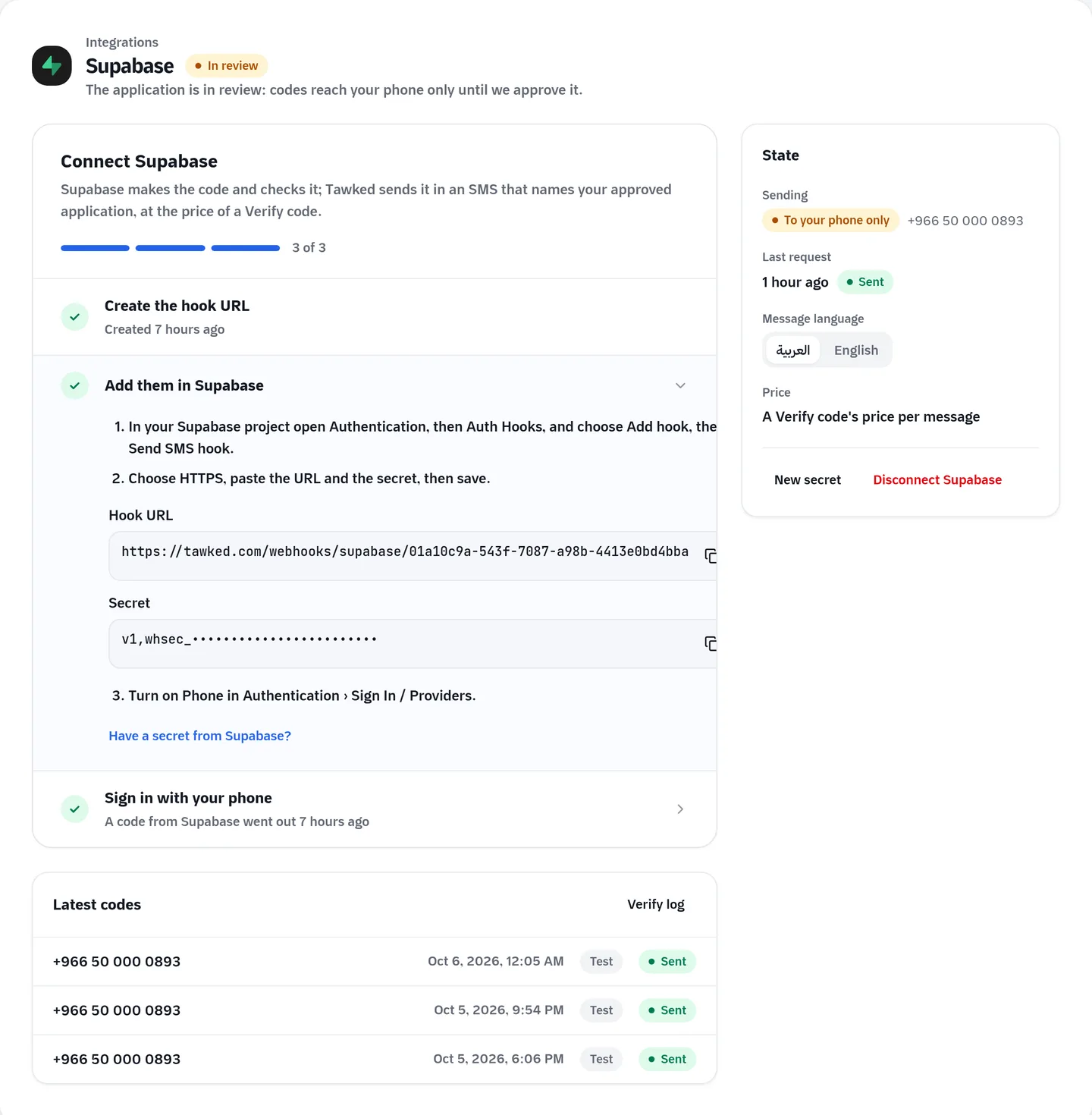
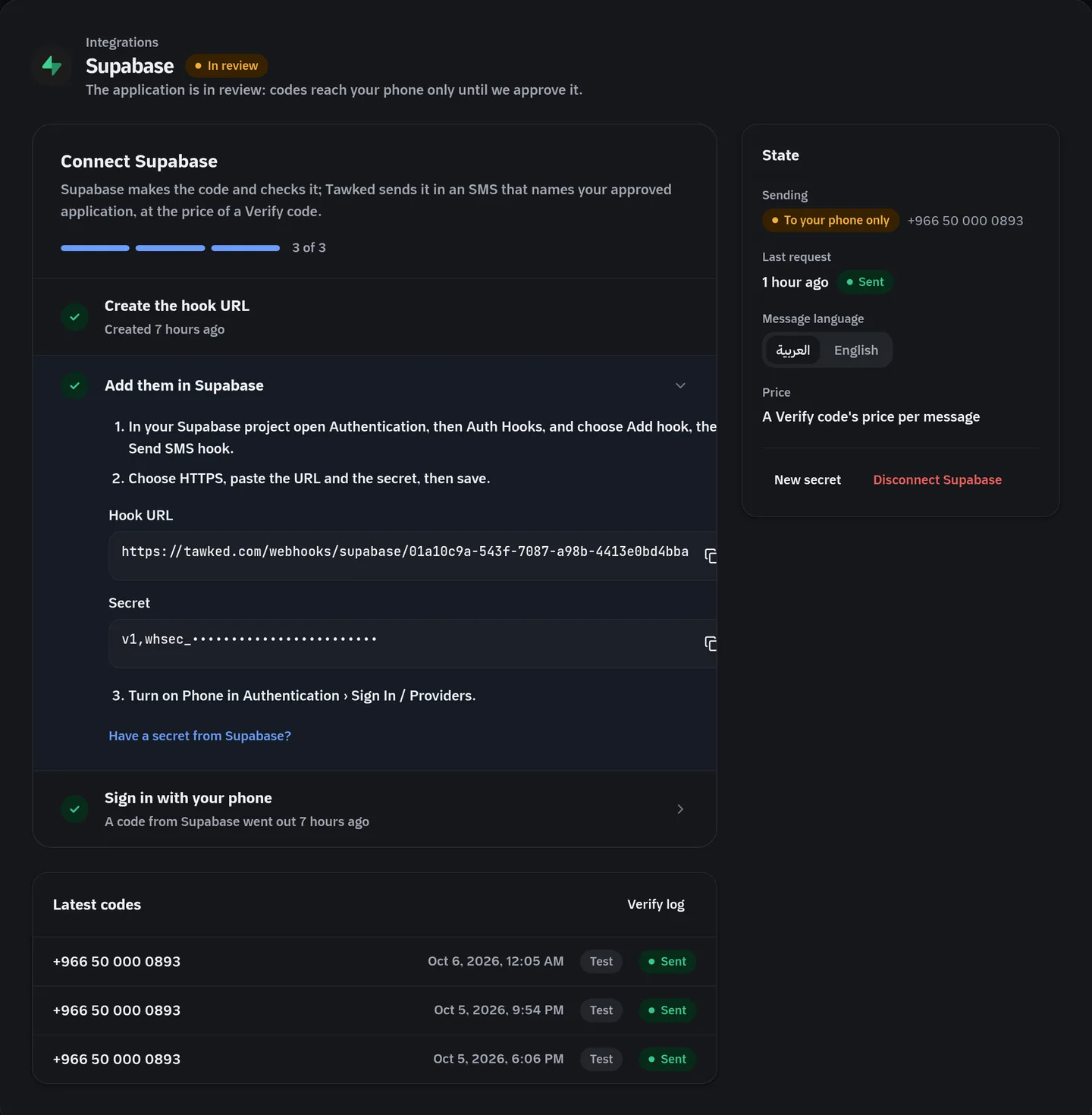
Create your account and your application, with Tawked Verify among its products. Open the application, then Integrations, then Supabase, and choose Create the connection. The page shows a Hook URL of the form https://tawked.com/webhooks/supabase/... and a Secret that starts with v1,whsec_. Whoever manages the application's API keys creates the connection and sees the Secret: the owner, or an admin or developer whose access covers the whole application and not only Verify.
2. In Supabase
Open your project, then Authentication › Auth Hooks, choose Add hook, then Send SMS hook. Pick HTTPS, paste the URL and the Secret, and save. If Supabase generated a secret for you instead, paste it into Tawked under "Have a secret from Supabase?". What matters is that both sides hold the same one.
3. Turn on phone sign-in
In Authentication › Sign In / Providers, turn on Phone. Then sign in to your app with your own phone. The Supabase page in Tawked updates by itself when the first request arrives and again when the first code goes out. If you want to test Tawked's side alone first, Send a test request on the same page sends what Supabase would send, to your own phone.
On a local stack run with the Supabase CLI, the same hook goes in supabase/config.toml under [auth.hook.send_sms]: enabled = true, the Hook URL as uri, and the Secret in secrets, read from an environment variable rather than written into the file.
Limits worth knowing before launch
Review comes first
Tawked reviews every application's name and website before its codes reach the public, because that name is in every message. Until approval, codes reach only the account owner's verified phone, each one starting with the "[TEST]" stamp, up to 10 test messages per application. Any other number is refused with a message saying the app is in review. Once approved, codes reach every Saudi mobile number and nothing changes on the Supabase side.
Saudi numbers only
If your project also serves other countries, route those numbers elsewhere on your side, because a hook has one address. For a non-Saudi number Tawked's answer carries status 422 and the message "Tawked sends codes to Saudi mobile numbers only (+966 5…).", and Supabase hands both to your app as they are.
The balance
Each code is paid from the account's prepaid balance. When it runs out, the request is refused with a message asking for a top-up, and the sign-in fails. Turn on the balance alert or auto top-up in the wallet.
Rate limits on both sides
Tawked applies its usual Verify caps: by default 5 codes per number per hour and 20 per IP address per hour, plus a daily spend cap if you set one. Supabase applies its own first. Its rate limits page says SMS defaults to 30 messages an hour for the whole project, and its phone login guide lets one user ask once every 60 seconds. Raise the project limit under Authentication › Rate Limits before launch, or sign-ins stop at the 31st message of the hour.
Supabase owns the expiry
Tawked never learns whether the user typed the right code, and it does not expire it. Supabase's docs say the code expires after one hour by default. Do not read these codes' state in the Verify log as the sign-in result; verifyOtp is the answer.
Questions
Do I change my app's code?
No. signInWithOtp and verifyOtp stay as they are, the whole connection lives in your project's settings, and no Tawked key goes into your app.
Does Tawked check the code?
No. Supabase makes and checks it; Tawked delivers it. Do not call Tawked's verify check endpoint for these codes.
What does a user with a non-Saudi number see?
Supabase answers your app with status 422 and Tawked's message. Show it, translate it for your users, or send that number to another provider.
What do 1,000 sign-ins cost?
If all 1,000 codes are delivered, SAR 90 at SAR 0.09 a code. A code that fails to send is not charged, and a request Supabase retries is not charged twice. All prices are on the pricing page.
Does it work with Lovable or Bolt?
Yes, when the project is connected to a Supabase project of its own where you can open Auth Hooks. The Tawked page for Supabase walks through it, and Tawked Verify lists every limit.
Sources (checked 2026-10-06)
- Supabase, Phone Login (providers, one-hour expiry, one request per 60 seconds): https://supabase.com/docs/guides/auth/phone-login
- Supabase, Send SMS Hook (replaces built-in sending, regional provider): https://supabase.com/docs/guides/auth/auth-hooks/send-sms-hook
- Supabase, Auth Hooks (five seconds, Standard Webhooks, Free and Pro plans): https://supabase.com/docs/guides/auth/auth-hooks
- Supabase, Rate limits (30 SMS an hour by default, changed under Authentication › Rate Limits): https://supabase.com/docs/guides/auth/rate-limits
- Supabase, Twilio setup (WhatsApp with Twilio and Twilio Verify only): https://supabase.com/docs/guides/auth/phone-login/twilio
- Supabase Auth source, the Twilio Verify provider (Twilio checks the code and writes the text): https://github.com/supabase/auth/blob/master/internal/api/sms_provider/twilio_verify.go
- Twilio SMS pricing, Saudi Arabia (USD 0.1949 per segment, USD 0.001 failed-message fee): https://www.twilio.com/en-us/sms/pricing/sa
- Twilio SMS guidelines, Saudi Arabia (pre-registration, about 2 weeks, no domestic brands): https://www.twilio.com/en-us/guidelines/sa/sms
- Twilio Verify pricing (USD 0.05 per successful verification plus channel fees): https://www.twilio.com/en-us/verify/pricing
- Vonage SMS pricing (Saudi Arabia chosen in the country list, USD 0.20167 per message): https://www.vonage.com/communications-apis/sms/pricing/
- Vonage, Saudi Arabia SMS Features and Restrictions: https://api.support.vonage.com/hc/en-us/articles/204017033-Saudi-Arabia-SMS-Features-and-Restrictions
- Bird SMS pricing (US rates only, per segment): https://bird.com/pricing/connectivity/sms
- Textlocal closure notice: https://webexinteract.com/textlocal/
- Tawked pricing: https://tawked.com/en/pricing
If a figure above is out of date, write to support@tawked.com and we will correct it with the new check date.