Oct 8, 2026 · by Tawked
Conversation menus in Tawked Chat: your own pages beside every WhatsApp conversation
Conversation menus put a page from your own systems, such as your order system or CRM, as a tab beside every conversation in Tawked Chat on the web and the phone, with the customer's phone number passed to it without code, at no extra cost.
When a customer asks on WhatsApp "where is my order?", the agent leaves the conversation, opens the order system in another window, searches by the customer's number, then comes back to answer. Conversation menus cut that trip short: from the Tawked console you add a page from your own system as a tab beside every conversation in Tawked Chat, and the agent sees that customer's orders without leaving the conversation. The customer's phone number or name reaches your page inside the link, with no code, the menu works on the web and in the phone app, and it comes with Tawked Chat at no extra cost.
The short answer
- What it is: a page from your systems, such as your order system, loyalty program or an internal form, shown as a tab beside "Conversation" in Tawked Chat on the web, and as an item in the conversation's menu in the phone app, which opens it full screen.
- Where you add it: in the console, under Chat, then Conversation menus. A name and a link, nothing else.
- The customer in the link, no code: you add "Customer phone", "Customer name", "Customer email" or "Conversation number" to the link, and it is filled in for each conversation.
- A check before you save: Tawked asks your site whether it may open inside the conversation, and the preview shows the tab as your team will see it. If the site refuses, your team opens it in a new window, with the customer's details.
- Limits: up to 10 menus per account, shown in every conversation of the account. The owner, and admins who see every application, add them; everyone else sees them read-only.
Why you want it
A customer service agent moves between the conversation and the business's systems dozens of times a day: the order number in one system, loyalty points in another, the shipping ticket in a third. Every move is a fresh search by the customer's number, and every search is a chance to mistype a digit or keep a customer waiting.
With the page beside the conversation, and the open customer's number already in it, the agent answers from one place. Your system needs no special integration: a search page that reads the phone number from its link is enough, and most systems already have one.
Adding a menu, step by step
Before you start: your application needs a connected WhatsApp number, and Tawked Chat must be on for your account. It turns on the first time someone on your team opens Chat from the console. Until then the page says "Turn on Tawked Chat first", with a button that opens Chat.
- Open the Tawked console, pick the application connected to a WhatsApp number, then Chat in the sidebar, then Conversation menus.
- Click Add menu.
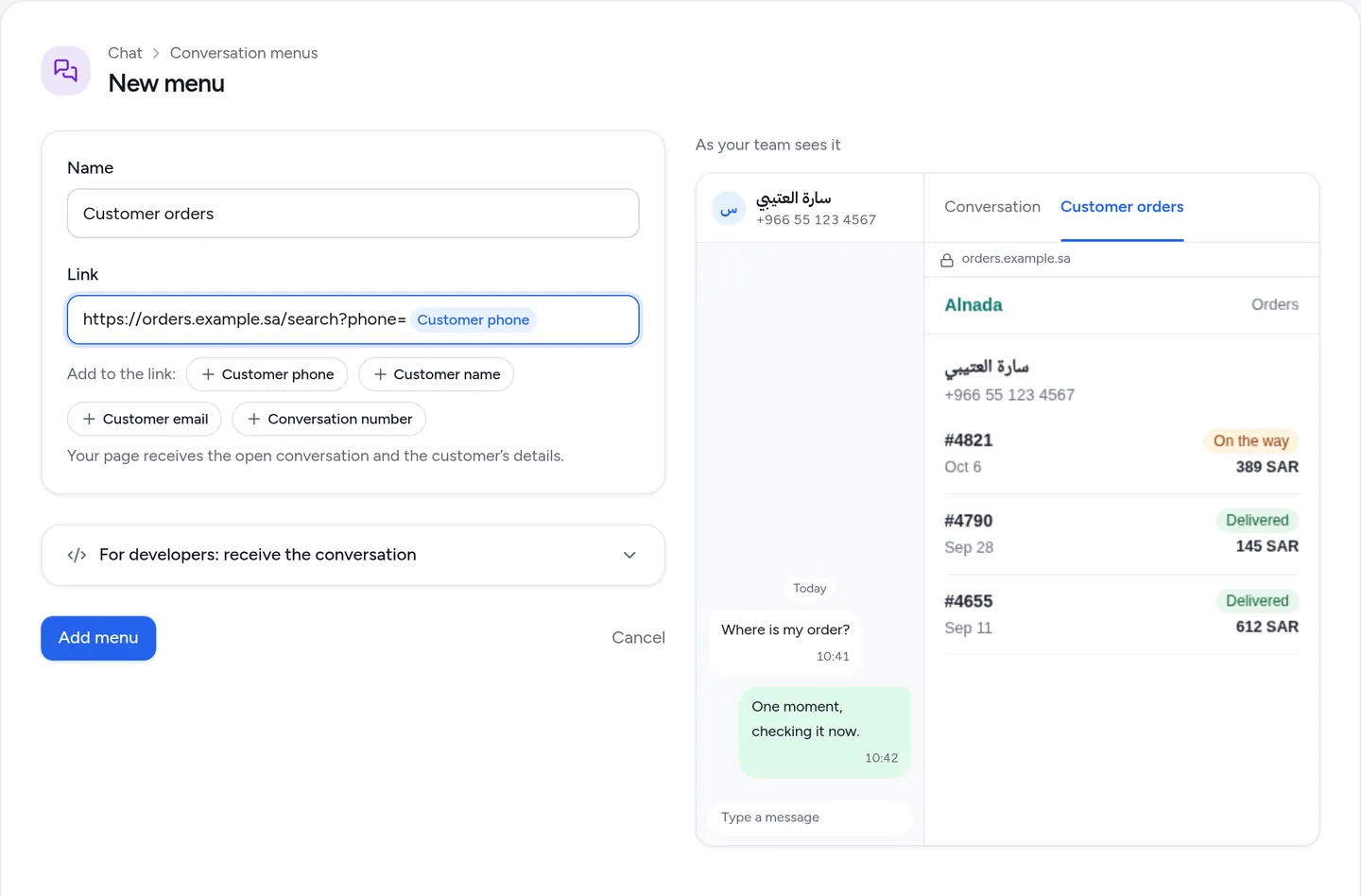
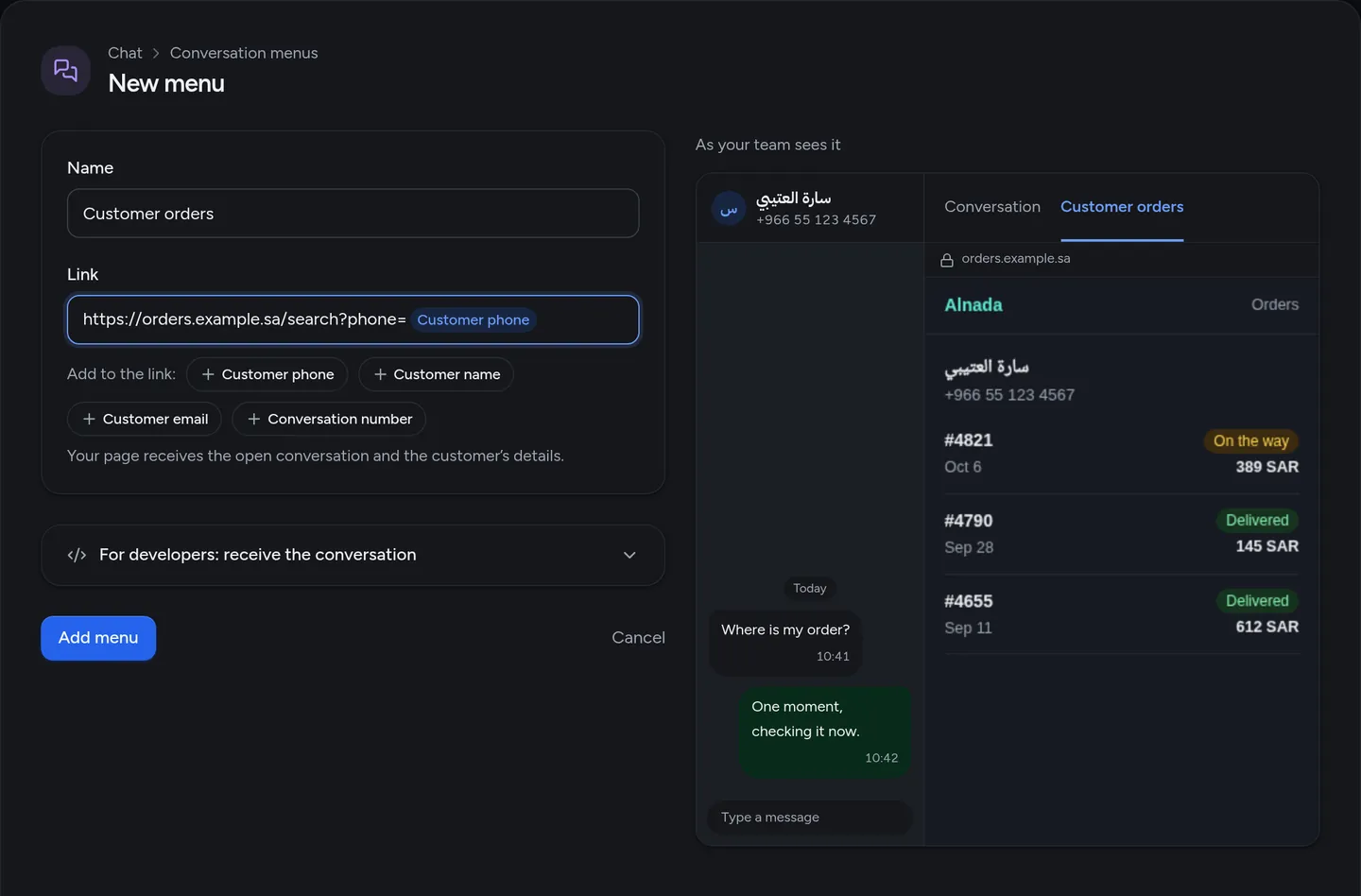
- Under Name, type what your team will see on the tab, 2 to 30 characters, such as "Customer orders". Each name is used once per account.
- Under Link, paste your page's address. It starts with
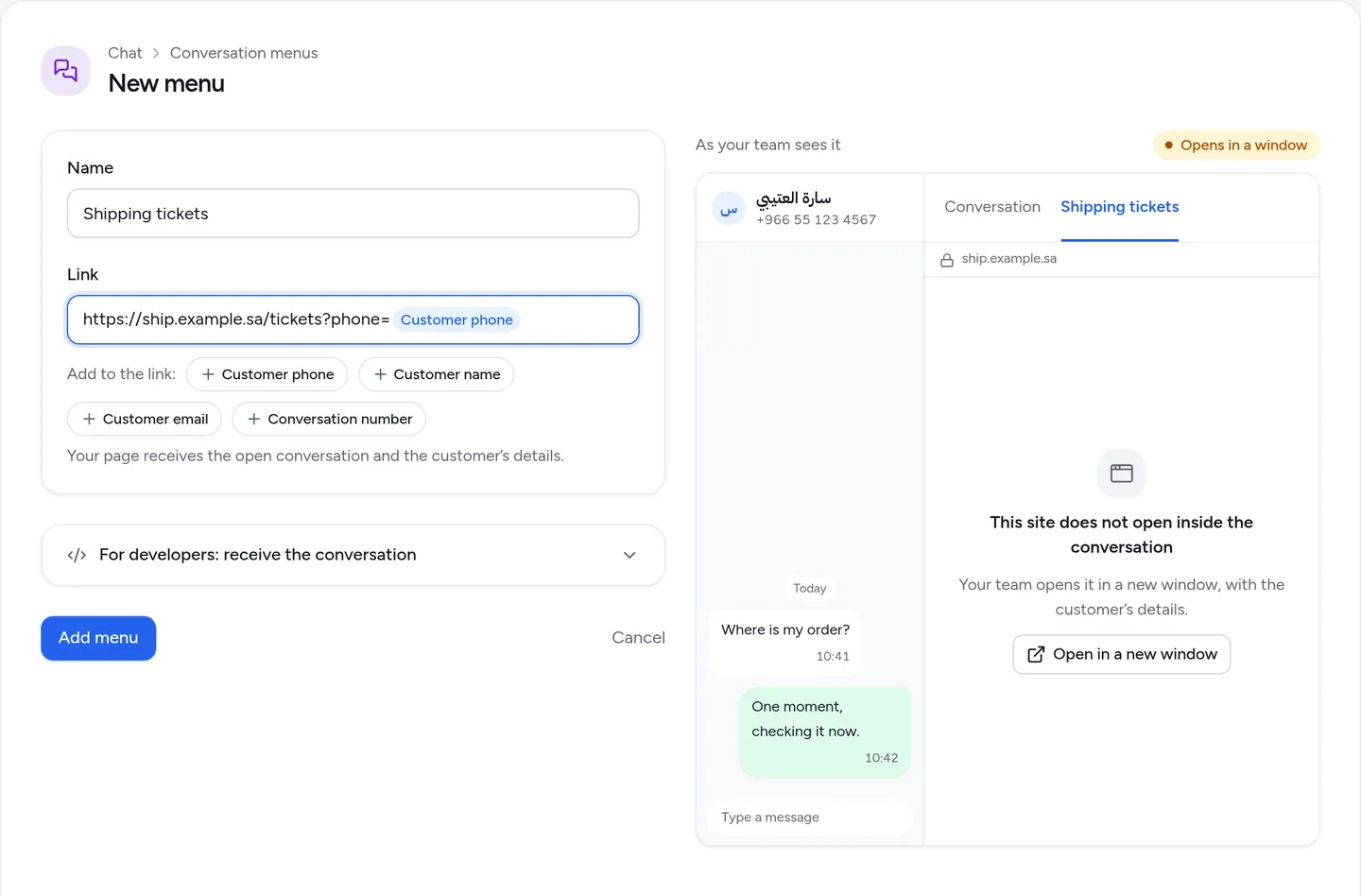
https://. - To pass the customer's details to your page, put the cursor where you want them in the link, then press one of the chips under "Add to the link": Customer phone, Customer name, Customer email or Conversation number. The chip appears inside the field, and each conversation fills in its own value.
- Look at the preview beside the fields: a drawn conversation with your new tab, and your page in it as your team will see it, for a sample customer.
- Click Add menu. Your team sees the tab after reloading Tawked Chat.
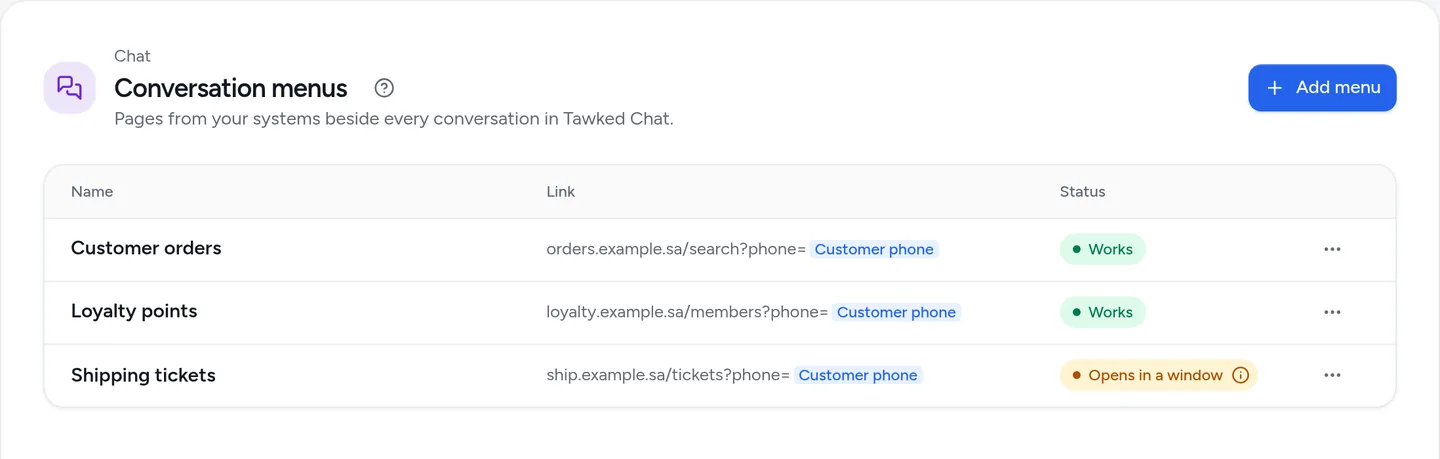
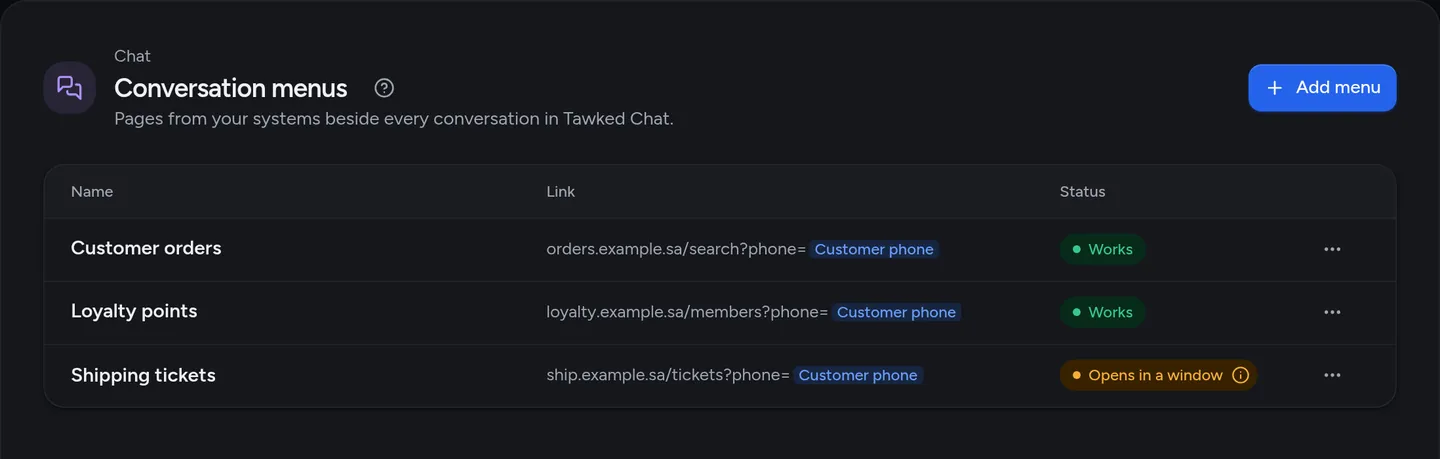
Your menus sit on one page, each with its name, its link and its status. "Works" means the site opens inside the conversation; "Opens in a window" means the site does not allow that, so your team opens it in a new window. To edit or delete a menu, click its row or the "⋯" button at its end.
When your site will not open inside the conversation
Some sites refuse to be shown inside another page, which is common for admin panels. Tawked checks this once you paste the link, before you save. If the site refuses, the preview says "This site does not open inside the conversation" and shows the status "Opens in a window" above it.
The check is advice, not a rule, and you can still save the menu. Your team gets an "Open in a new window" button in the tab, with the customer's details already filled into the link. In the phone app the page opens full screen either way.
If the site is yours, let it open inside Tawked Chat by sending the header Content-Security-Policy: frame-ancestors https://chat.tawked.com on its pages. Tawked checks again whenever the menu is saved.
What it looks like in Tawked Chat
On the web, at chat.tawked.com, the menu's name is a tab beside "Conversation" in every conversation. The agent clicks it, your page opens in place of the conversation with the details of the customer they are talking to, and one click on "Conversation" brings them back.
In the Tawked Chat phone app, the menu is an item in the conversation's menu, and it opens your page full screen.
Menus belong to the whole account, so they show in every conversation of the account, whichever application or number it came through. Salla stores also get a tab Tawked adds, "Salla orders": it shows in your list marked "From Tawked", is managed from the store's page, and does not count toward your ten menus.
For developers
The four chips are tokens in the link: {customer_phone}, {customer_name}, {customer_email} and {conversation_id}. Tawked fills them for each conversation, URL-encoded, and leaves a token empty when its value is missing, such as the email of a customer who never gave one. For example:
https://orders.example.sa/search?phone={customer_phone}
A link that holds a token, and a site that refuses to be shown inside the conversation, open first through a Tawked page that fills the tokens and then moves the same frame to your page.
For your page to read the open conversation without tokens in the link, add Tawked's script:
<script src="https://tawked.com/js/tawked-chat-menu.js"></script>
<script>
  TawkedChat.onConversation(function (c) {
    // c.conversation.id
    // c.customer.name, c.customer.phone, c.customer.email
    // c.agent.name
  });
</script>
Your function is called as soon as the conversation is known. It may be called again when the agent moves to another conversation, so let your page replace what it shows each time. The script works on the web and in the phone app.
This data is a hint from the open conversation, not proof of identity: anyone who has your page's link can open it. So your page signs its own user in before it shows customer data. The details are in the conversation menus docs.
Questions
Do conversation menus work in the phone app?
Yes. Each menu is an item in the conversation's menu in the Tawked Chat phone app, and it opens your page full screen, even a site that will not open inside the conversation on the web.
Can my page tell who the customer is?
Yes, two ways. Without code, add Customer phone, Customer name, Customer email or Conversation number to the link. With code, the tawked-chat-menu.js script gives your page the open conversation, the customer's details and the agent's name. Either way the data is a hint, so your page signs its own user in.
What if my site refuses to open inside the conversation?
Tawked tells you before you save, and you can save anyway. Your team gets an "Open in a new window" button in the tab with the customer's details in the link, and on the phone the page opens full screen. If the site is yours, add https://chat.tawked.com to frame-ancestors in its headers.
How many menus can I add?
Up to 10 per account, and they show in every conversation of the account. The "Salla orders" tab Tawked adds for Salla stores does not count toward them.
Who can add and edit menus?
The owner, and admins who see every application of the account. Anyone else who opens Chat sees the menus but cannot change them.
Read next
- Tawked Chat: the shared inbox for your WhatsApp number, on the web and the phone.
- Conversation menus docs for the tokens and the script.