Oct 6, 2026 · by Tawked
WooCommerce phone login and WhatsApp updates in Saudi Arabia
The free Tawked plugin for WooCommerce: phone sign-in, a code before cash on delivery at SAR 0.09 per delivered code, and WhatsApp updates from your number.
For a WooCommerce store selling to Saudi customers, the Tawked plugin adds three things from one settings tab: phone sign-in beside the password form, a code that proves the customer's number before cash on delivery, and WhatsApp order updates sent from the store's own number. The plugin is free. Tawked charges SAR 0.09 per SMS code that is actually delivered, and for WhatsApp messages Meta bills you directly while Tawked adds nothing on top.
The short answer
- Phone sign-in sits beside the password, never instead of it. "Sign in with your phone" appears on My Account and on the WordPress sign-in page; administrator and staff accounts always use their password.
- A code before cash on delivery, or before every order. You choose when it is asked for, and it is checked on the server on the classic checkout and in the Checkout block.
- Order updates from your own number. Each order status maps to a utility template Meta has approved, sent from the WhatsApp number connected to your Tawked application.
- Cost: the plugin is free; codes are SAR 0.09 each when delivered, from prepaid credit, and a code that fails is not charged. New accounts start with SAR 10 of free credit.
- Limits: Saudi mobile numbers only, WhatsApp needs Meta-approved templates, and codes reach customers only after Tawked has reviewed and approved your application.
The problem this solves
WooCommerce puts a cash on delivery order straight into Processing and waits for you to mark it Completed once the money is collected. So the order moves into packing and shipping with nothing confirming that the number on it belongs to the person who placed it. One wrong digit, or a prank order, and a courier drives out and brings the parcel back.
After the order, customers ask where it is, and they ask on WhatsApp because that is the app they have open. An update that lands there first, from the store's own number, saves a round of "where is my order?" messages.
And someone who buys twice a year will not remember a password; a code on their phone gets them back in.
How it works
Phone sign-in
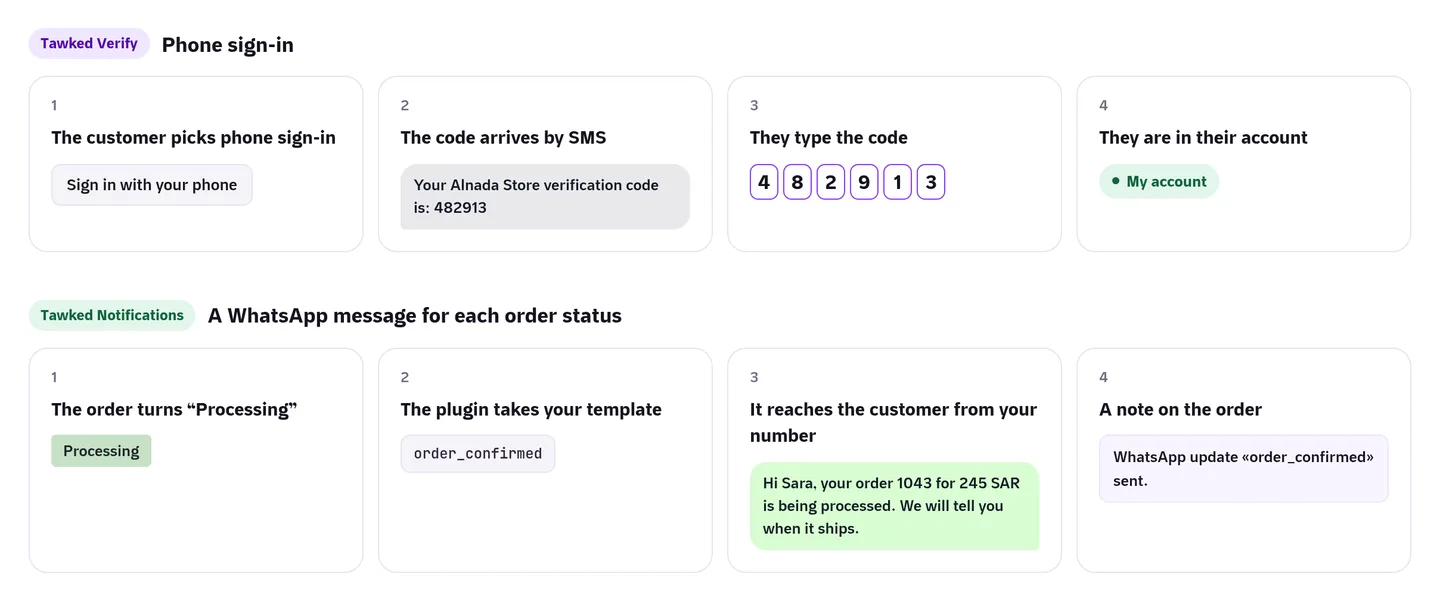
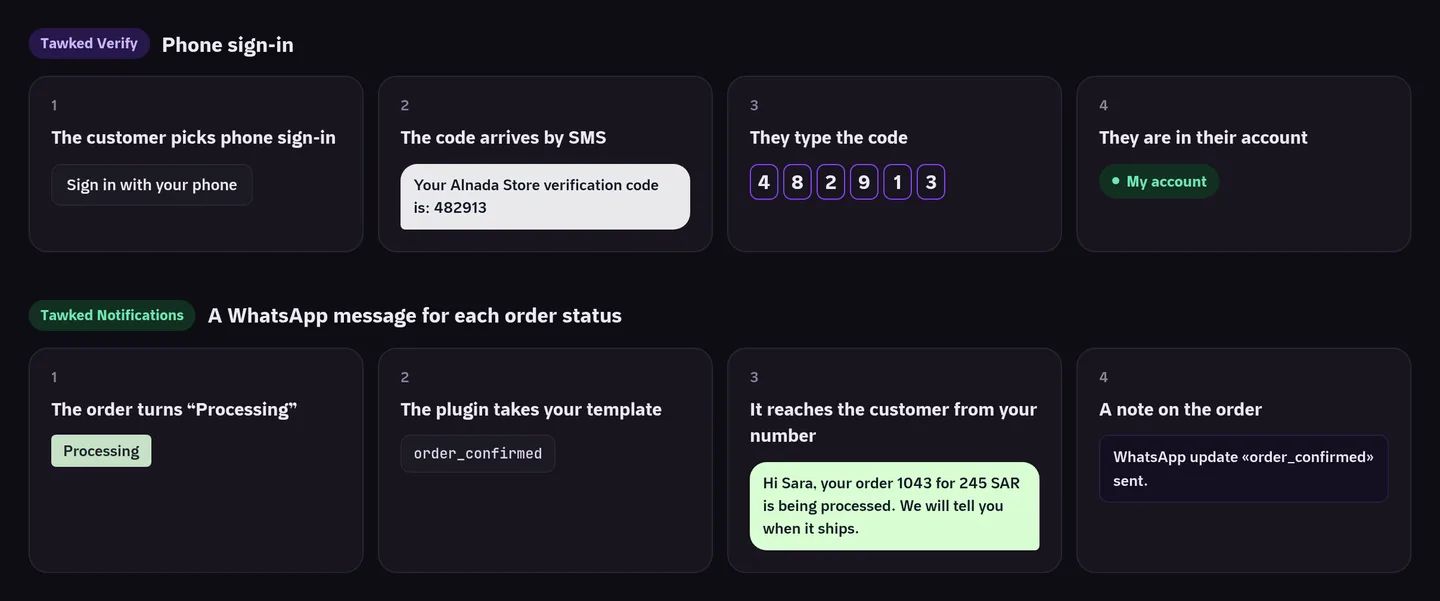
On My Account the customer taps "Sign in with your phone" and types their number in any of the usual Saudi forms (05XXXXXXXX, 9665XXXXXXXX or +9665XXXXXXXX). An SMS arrives from Tawked's sender ID, and this is what it says on their phone:
"Your Alnada Store verification code is: 482913"
The store name in that text is your application's name as Tawked approved it after review. The sender shown on the phone is always Tawked's own sender ID. The customer types the code and they are in. Tawked creates and checks the code, so WordPress never learns the right code and never stores it.
A number signs in only after its owner has verified it once with a code. An existing customer does that under My Account › Account details; the billing phone on an old order signs no one in. When the number has no account, WooCommerce registration is on and the plugin's "Sign-up by phone" is ticked, the plugin asks for a first name and an email and creates the account with the verified number. Accounts that can edit content or manage the store never get phone sign-in, and neither do accounts with two-factor turned on. They keep their password sign-in.
A code before cash on delivery
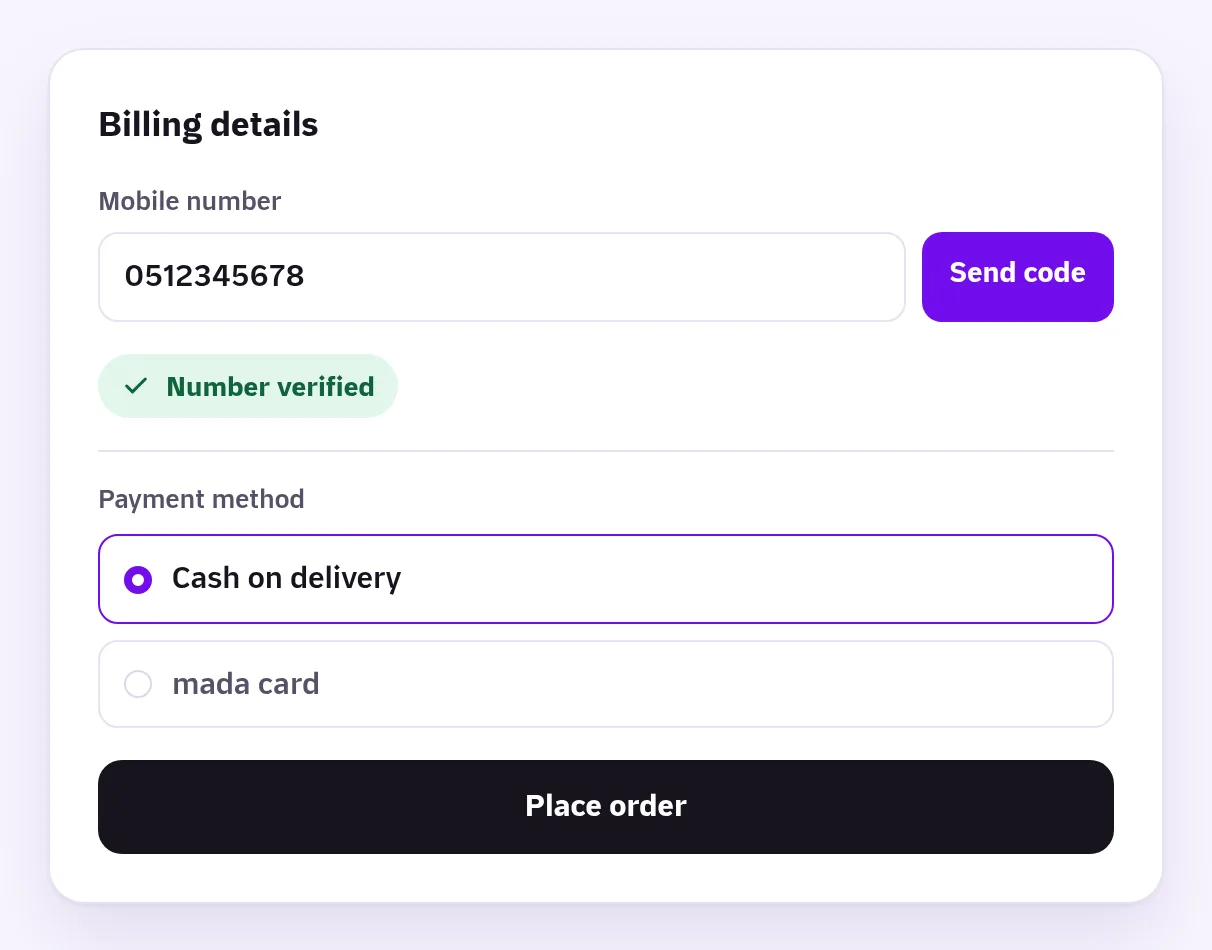
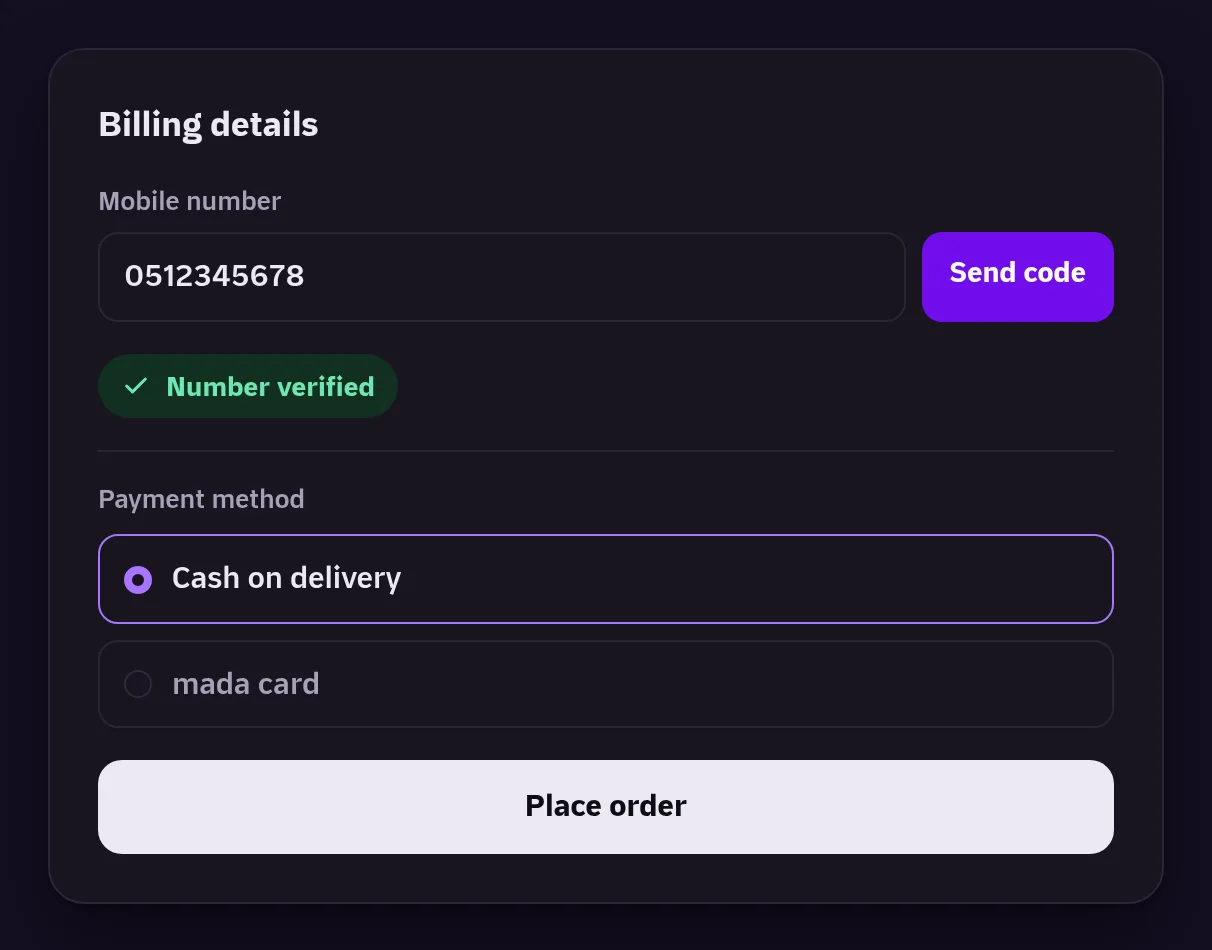
The plugin's Checkout section has three settings: never, for every order, or for payment methods you pick, with cash on delivery picked by default. On the classic checkout a "Send code" control sits under the mobile number; in the Checkout block the step shows under the payment methods. Both are enforced on the server, so editing the page in the browser does not get around it.
One code covers one order for half an hour. If a card is declined and the customer tries again, the code still holds and you do not pay for a second SMS. A number outside Saudi Arabia is refused by default, or you can let those orders through unverified. The pay-for-order page of a pending order is covered too, so an old order cannot be switched to cash on delivery without a code.
WhatsApp order updates
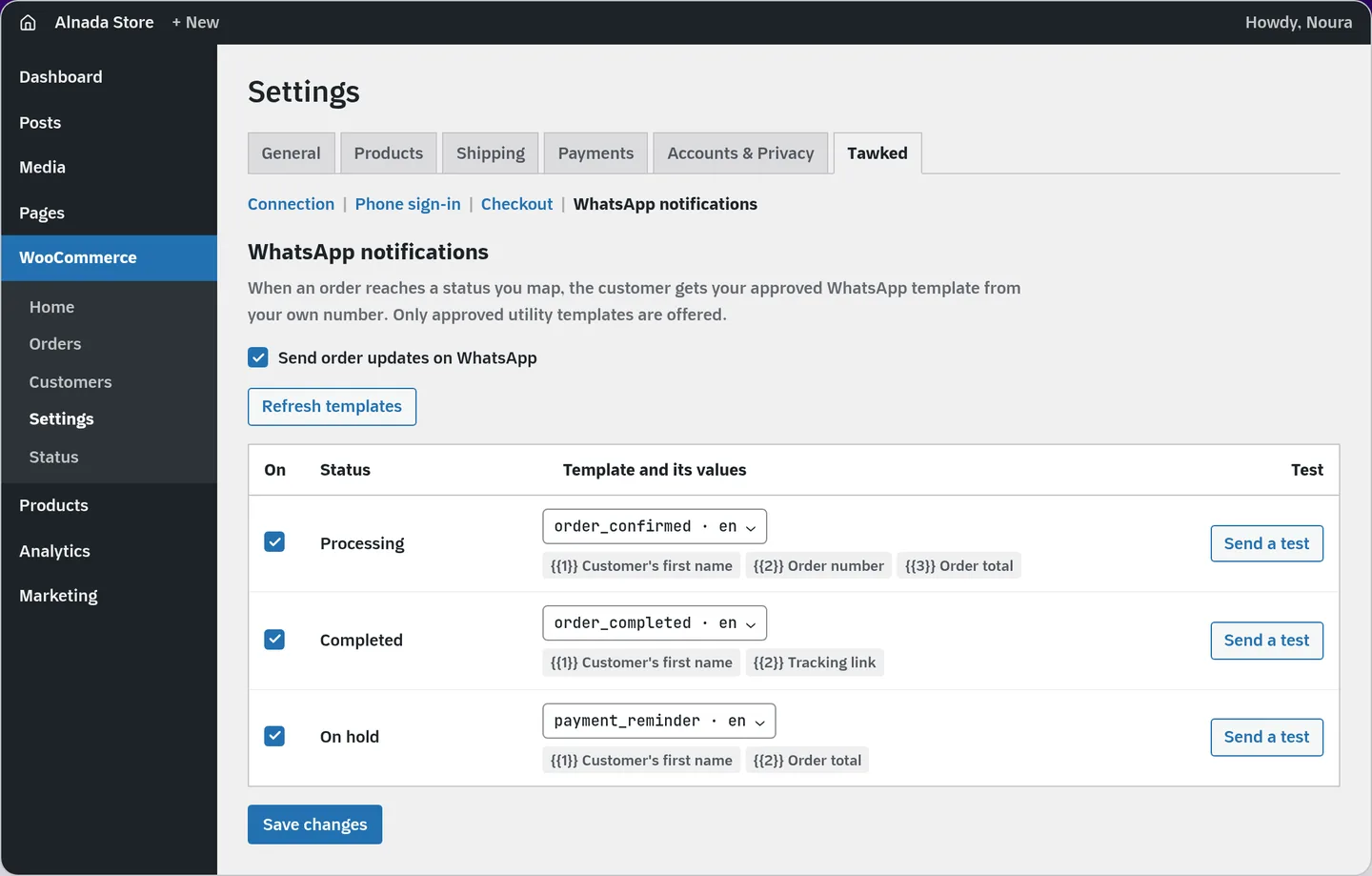
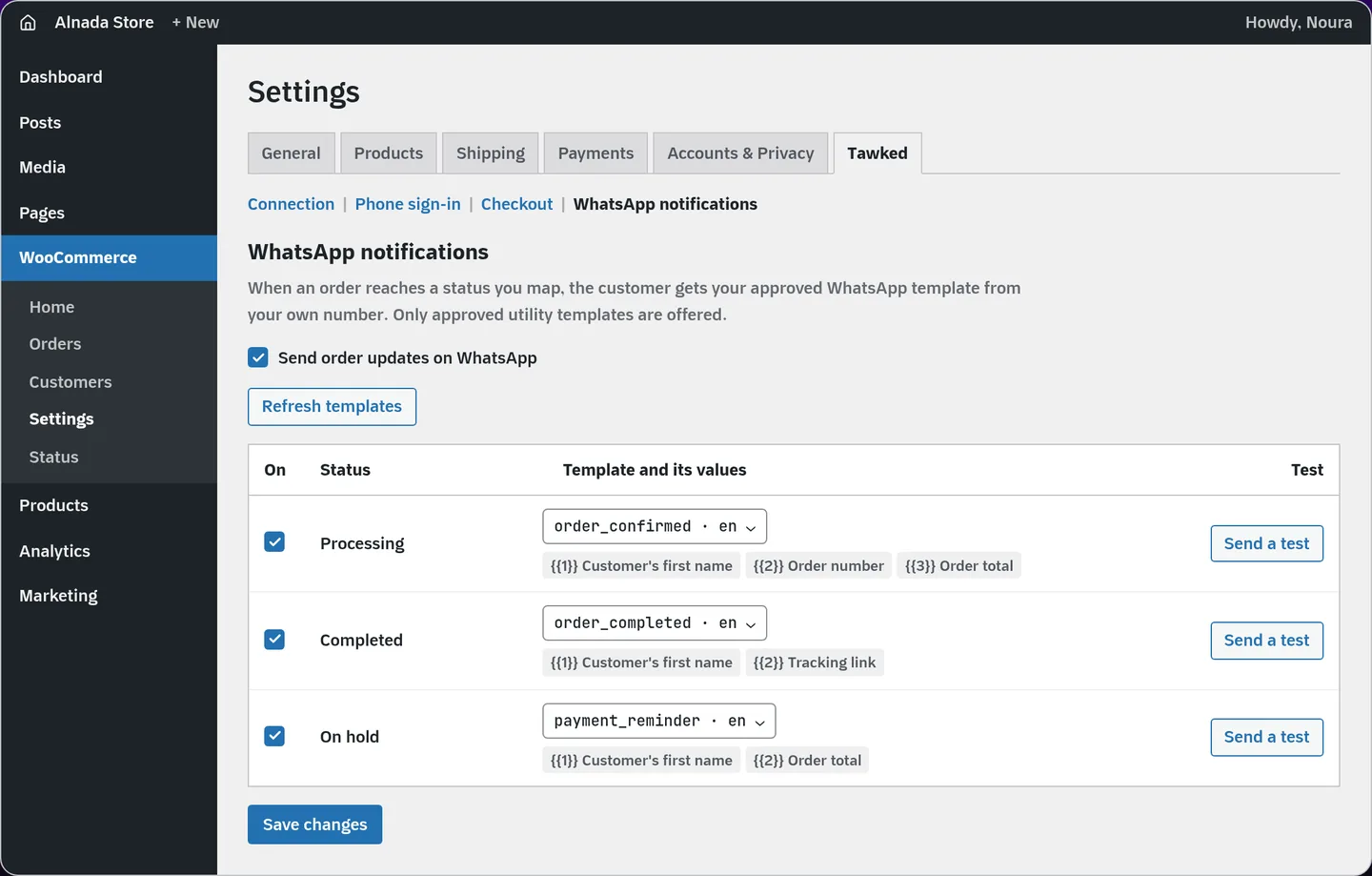
The WhatsApp notifications section is a table of order statuses, including custom statuses other plugins register. Switch a status on, pick one of your templates, and map each placeholder to an order value: order number, the customer's first or full name, order total, status, tracking link, order page link, store name, or a fixed text you type. Only approved utility templates are offered. Marketing templates need consent the plugin does not collect, and authentication templates are for codes. Templates whose header is an image, video or document are not supported in this version.
When an order turns Processing, for example, the customer gets something like this from your number:
"Hi Sara, your order 1043 for 245 SAR is being processed. We will tell you when it ships."
Sends run in the background through Action Scheduler, so checkout does not wait on them. A failed send is retried after 1, 5 and 15 minutes with the same idempotency key, so it never arrives twice. A sent message, or one that finally failed, leaves a private note on the order, so you can see what went out from the order screen.
Meta expects customers to agree before a business writes to them, so by default the plugin adds an opt-in box at checkout and sends updates only to customers who tick it. A setting sends them to every customer with a Saudi mobile instead; their consent is then yours to answer for with Meta.
On cost: Meta charges for a utility template when it is delivered, and a utility template sent inside an open customer service window is free. That window is the 24 hours after the customer last wrote to you. Meta publishes per-country rates in a calculator and in downloadable rate cards, so look up the Saudi utility rate there before you budget a month.
Comparison
Phone sign-in and a code at checkout
| Option | Plugin price | Message cost | Sent from | Code at checkout |
|---|---|---|---|---|
| Digits (CodeCanyon) | USD 39 (about SAR 146.25), regular license with 6 months of support | Paid to the SMS gateway you connect (100+ listed, Firebase among them) | Depends on the gateway | Phone verification at checkout |
| OTP Login With Phone Number (wordpress.org) | Free; Pro price not public on its page | Free version uses Firebase: Blaze plan, billed per SMS sent | Firebase or a gateway you pick | Yes, on login, registration and checkout |
| The Tawked plugin | Free | SAR 0.09 per delivered code; failed codes not charged | Tawked's sender ID, your approved application's name in the text | Yes: every order or chosen payment methods, classic and block checkout |
WhatsApp order updates
| Approach | What happens | Cost | What WhatsApp says |
|---|---|---|---|
| Click-to-chat button (for example Click to Chat) | Opens a chat the customer starts; sends nothing on its own | Free, with a PRO version | Nothing to note: nothing is sent automatically |
| A tool that links a regular WhatsApp account by scanning a QR code | Sends automatically from a WhatsApp Web session | Varies by tool | WhatsApp's terms bar "bulk messaging, auto-messaging"; its business policy says Meta can limit or remove access |
| A subscription platform on the official API (for example Wati) | Sends approved templates; has a WooCommerce integration | Growth plan USD 119 a month billed yearly (about SAR 446.25), listed down from USD 130 | Official API; how Meta fees are passed on: not public on the pricing page |
| The Tawked plugin | Approved utility templates from your number, one message per status | Plugin free; Meta bills you directly; Tawked adds nothing | Official API, connected through Embedded Signup |
Prices are from each company's own page as opened on 2026-10-06, converted at SAR 3.75 to the dollar. None of these pages said whether VAT is included.
What the tables leave out
Digits is paid once, but every SMS after that is paid to a gateway at its rate and by its rules. Firebase, for one, bills Phone Auth per SMS sent. If you want SMS to show your store's own sender name, you need a gateway that registers a sender ID for you (how sender IDs work in Saudi Arabia); Tawked does not offer that for codes. Abuse protection also differs from plugin to plugin: limits per number, per IP and for the whole store. Read those settings before you open phone sign-in to every visitor.
Subscription platforms also sell a shared inbox, campaigns and team seats. If you need those, compare more than the price of a message: the first version of the Tawked plugin sends no campaigns and no abandoned cart reminders.
Setup, step by step
- Create your account from the Tawked plugin page. Verify and Notifications come preselected; create your application. Once it exists, its WooCommerce page opens by itself. Later you reach it from your application › Integrations › WooCommerce › Connect.
- Connect your store's WhatsApp number with "Connect WhatsApp", and submit at least one utility template for Meta's approval. Meta's hello_world and marketing templates do not count.
- Download the plugin from the "Download and install the plugin" step, or directly at https://tawked.com/downloads/tawked-woocommerce.zip. In WordPress, open Plugins › Add New Plugin › Upload Plugin, choose the file, install and activate. It needs WordPress 6.6 or newer, WooCommerce 9.0 or newer and PHP 7.4 or newer.
- In "Create the plugin's keys", press "Create the key" for the live key, and for the test key if your application is still in review. Copy each key as soon as it appears; it will not show again.
- In WordPress, open WooCommerce › Settings, then the "Tawked" tab and its "Connection" section. Paste the live key in "Live key" and the test key in "Test key", save, and press "Test connection". The Tawked page waits for the plugin's first call, updates by itself, and then shows "Last call".
- Turn on what you want in the other three sections: "Phone sign-in", "Checkout" and "WhatsApp notifications". Map your statuses to templates, then press "Send a test" and type your number to see the latest order's message on your phone.
- Wait for approval. Tawked reviews the application's name and website; once approved, codes reach every Saudi number. Untick "Use the test key for codes" then; pressing "Test connection" with the approved live key also turns it off.
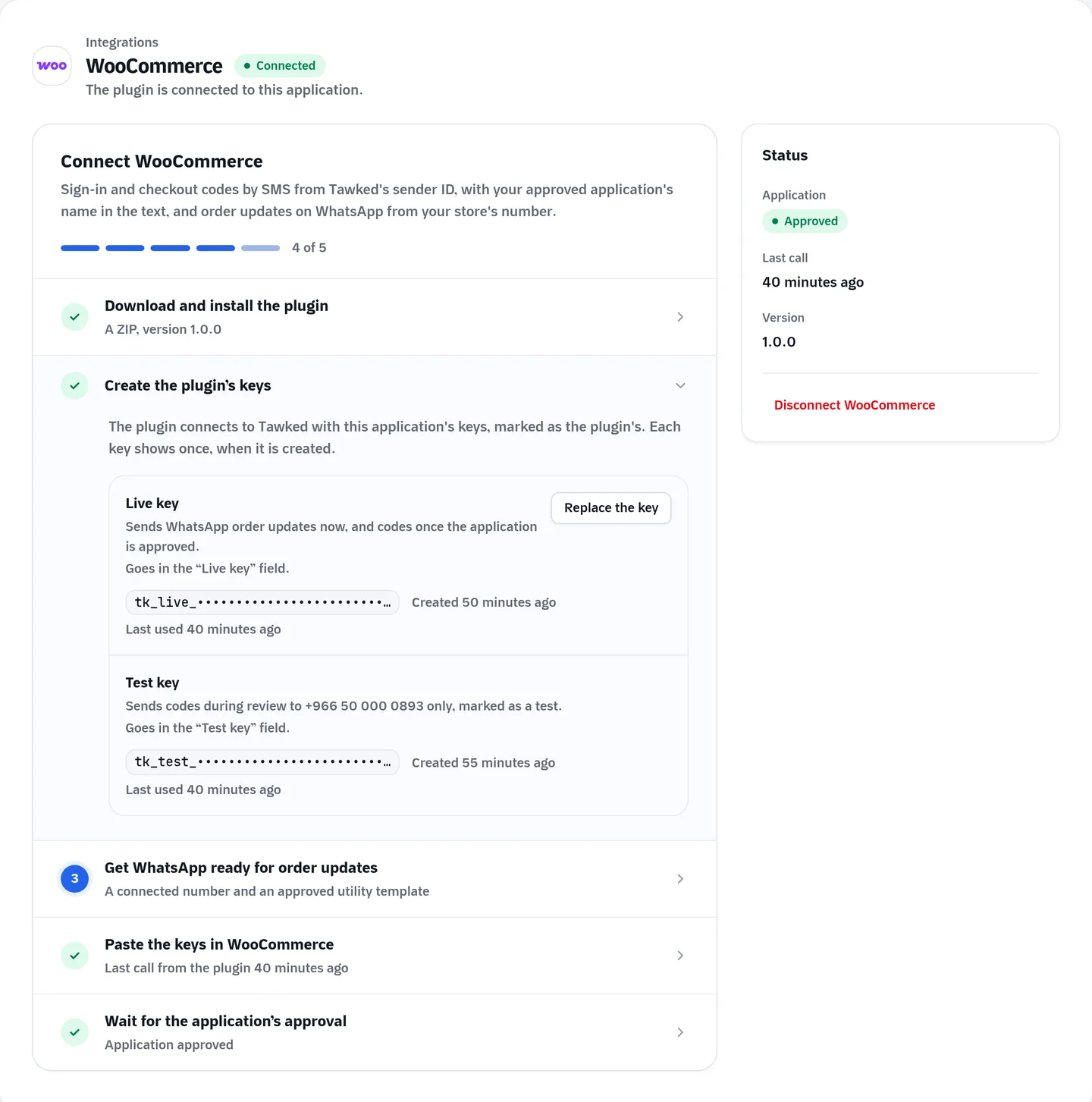
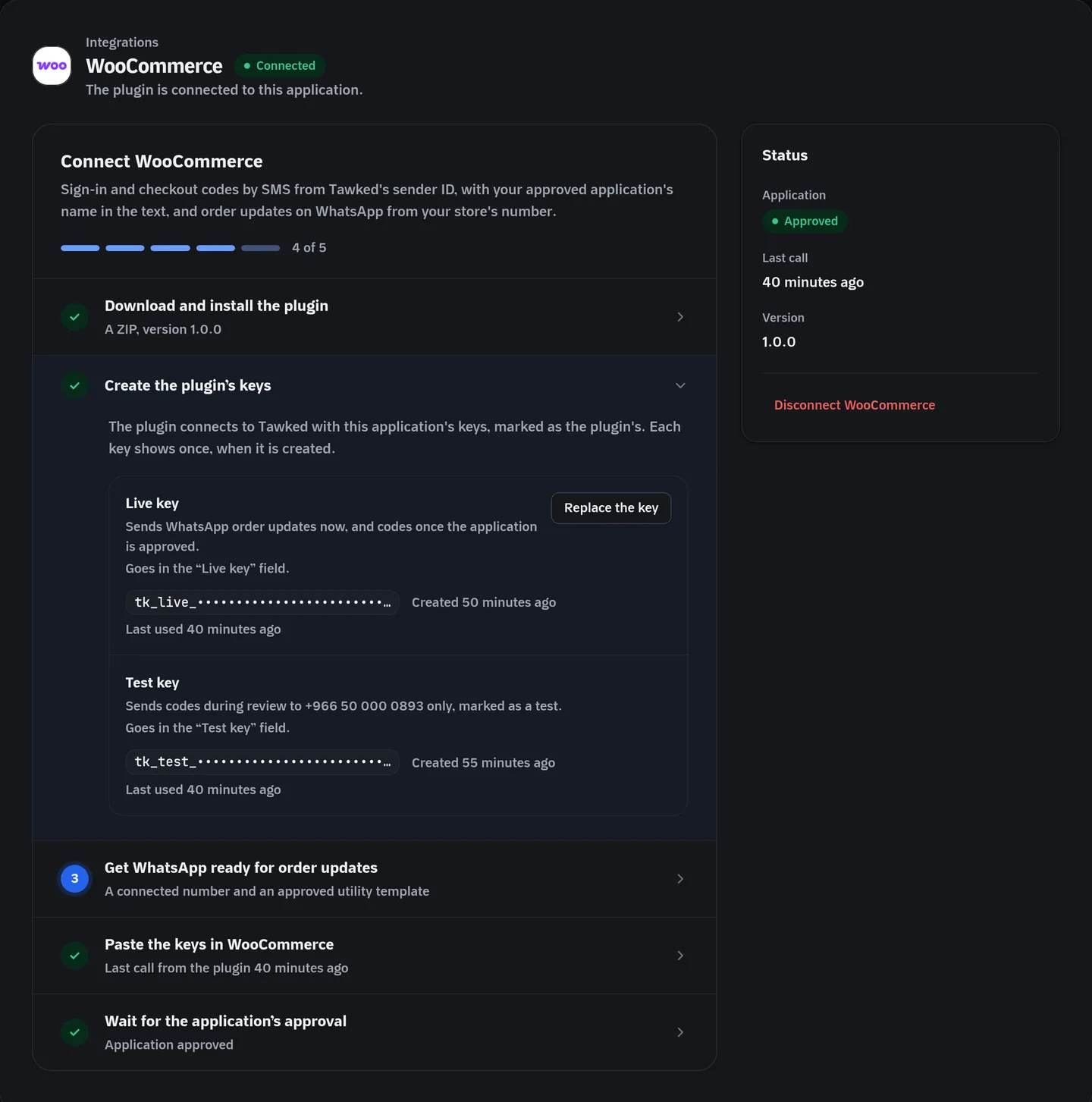
To keep the keys out of the database, set them in wp-config.php as TAWKED_LIVE_KEY and TAWKED_TEST_KEY; the settings fields are then locked.
Protection against abuse
Every code that goes out is charged to your balance, so the plugin adds its own limits on top of Tawked's:
- Per number: one code a minute and three in 15 minutes; ten wrong codes in an hour stop new codes for that number.
- Per IP address: 20 codes an hour.
- For the whole store: 20 codes a minute and 200 an hour by default, which you change in the settings. A "Daily spend cap" in the application's Verify settings in Tawked adds one more ceiling.
- Tawked itself ends a verification after three wrong attempts.
The key never leaves your server, and a request already refused by a number's or an address's own limit does not count against the store-wide cap, so one visitor cannot use it up for everyone else.
Limits worth knowing
- Codes and WhatsApp messages go to Saudi mobile numbers only. If a large share of your customers are abroad, this plugin is not enough on its own.
- Tawked reviews every application before its codes reach customers. Until then the test key sends codes only to the account owner's verified phone, each starting with [TEST], 10 sends for the application in all. The plugin warns on every admin page while the test key is on, because customers receive no codes then.
- WhatsApp updates work with the live key while the application is in review, but they need a connected number and an approved utility template.
- The SMS comes from Tawked's sender ID. If your store's name must appear as the sender, Tawked is not the right choice.
- The plugin is downloaded from Tawked; it is not in the WordPress plugin directory yet. Network activation on WordPress multisite is not supported in this version.
- If you run another two-factor plugin, turn phone sign-in off: it does not ask for a second factor.
Questions
Does it work with HPOS and the Checkout block?
Yes, and it declares compatibility with both. The Checkout block has been the default for new stores since WooCommerce 8.3, and High-Performance Order Storage has been on by default for new stores since 8.2.
If an order goes back to the same status, does the message go again?
No. One message per status per order.
Does Tawked charge anything on WhatsApp messages?
Nothing at the moment. Meta's fees are paid to Meta directly at its published rates.
What happens with a number outside Saudi Arabia?
When checkout asks for a code, the order is refused by default, or let through unverified if you choose. A WhatsApp update is skipped with a note on the order.
Are the codes sent by SMS or WhatsApp?
By SMS in this plugin. The trade-offs between the two channels are in SMS or WhatsApp OTP in Saudi Arabia.
More on Tawked Verify, Tawked Notifications and pricing.
Sources (checked 2026-10-06)
- WooCommerce, Cash on Delivery: https://woocommerce.com/document/cash-on-delivery/
- WooCommerce, Cart and Checkout blocks status: https://woocommerce.com/document/cart-checkout-blocks-status/
- WooCommerce, High-Performance Order Storage: https://developer.woocommerce.com/docs/features/high-performance-order-storage/
- WordPress, Manage Plugins (upload a ZIP): https://wordpress.org/documentation/article/manage-plugins/
- Meta, WhatsApp Business Platform pricing: https://developers.facebook.com/docs/whatsapp/pricing
- Meta, pricing calculator: https://whatsappbusiness.com/products/platform-pricing/
- WhatsApp Business Messaging Policy: https://whatsappbusiness.com/policy/
- WhatsApp Terms of Service: https://www.whatsapp.com/legal/terms-of-service
- Digits on CodeCanyon: https://codecanyon.net/item/digits-wordpress-mobile-number-signup-and-login/19801105
- OTP Login With Phone Number on wordpress.org: https://wordpress.org/plugins/login-with-phone-number/
- Firebase pricing (Phone Auth): https://firebase.google.com/pricing
- Click to Chat on wordpress.org: https://wordpress.org/plugins/click-to-chat-for-whatsapp/
- Wati pricing: https://www.wati.io/ar/pricing
- Wati WooCommerce integration: https://www.wati.io/integrations/woocommerce/
- Tawked pricing: https://tawked.com/en/pricing